Agriculture is the true heartbeat of Andhra Pradesh’s economy. Did you know that agriculture and allied activities contribute a massive 37% of Andhra Pradesh’s Gross State Domestic Product (GSDP)? Because so many families rely on farming, having reliable financial support can make a huge difference between a tough season and a successful harvest.
To help farmers cope with high input costs—such as buying quality seeds, fertilizers, and managing seasonal crop expenses—the Government of Andhra Pradesh has reinstated its flagship direct income support initiative: the Annadata Sukhibhava Scheme.
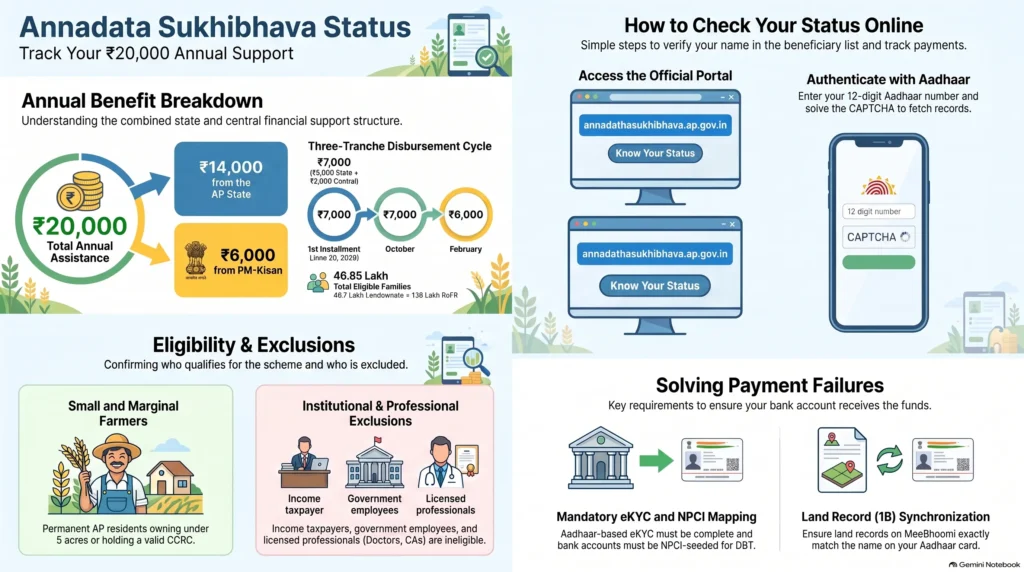
Under this revamped program, eligible farming families receive an annual financial boost of Rs. 20,000. This is a joint initiative that combines Rs. 14,000 from the Andhra Pradesh State Government and Rs. 6,000 from the Central Government’s PM Kisan Samman Nidhi Yojana.
If you are a farmer in Andhra Pradesh, keeping a close eye on your Annadata Sukhibhava Status is the best way to make sure your payments arrive safely and on time. In this ultimate guide, we will walk you through checking your status online, understanding your verification results, and resolving common payment delays like eKYC or NPCI bank account issues.
What is the Annadata Sukhibhava Scheme?
The Annadata Sukhibhava Scheme (which beautifully translates to “May the Food Provider Prosper”) is a comprehensive farmer investment support program. Originally introduced during the TDP administration’s 2018-19 fiscal year with an initial allocation of Rs. 5,000 crore, the scheme has a rich history of helping rural communities. In its early 2019 phase, it functioned as a top-up program, offering Rs. 9,000 to central PM-Kisan beneficiaries and Rs. 15,000 directly to non-beneficiaries.
Following a change in state leadership, the program was briefly replaced by the YSR Rythu Bharosa scheme, which provided Rs. 13,500 annually. However, in June 2024, the TDP-led coalition government returned to office and proudly relaunched the Annadata Sukhibhava Scheme as part of its “Super Six” welfare guarantees.
To give farmers even stronger financial security, the relaunch increased the total annual benefit to a substantial Rs. 20,000 per family unit. The program distributes these funds across three key agricultural cycles (Kharif, Rabi, and winter harvests) directly to farmers’ bank accounts.
Step-by-Step Guide: How to Check Your Annadata Sukhibhava Status Online
Checking your application or payment status takes only a couple of minutes. To check your status online, simply follow these official steps:
- Visit the Official Website: Open your web browser and go to the official portal at
annadathasukhibhava.ap.gov.in. - Access the Status Tool: On the homepage, look for and click on the “Know Your Status” option.
- Enter Your Aadhaar Number: Input your correct 12-digit Aadhaar number into the designated field. Make sure you do not enter any spaces or special characters.
- Complete the CAPTCHA: Type the security verification CAPTCHA code exactly as it is displayed on your screen.
- Get Your Results: Click the “Search” button.
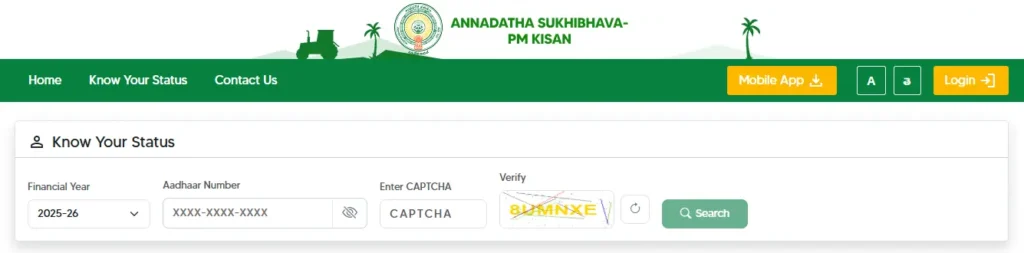
Once clicked, the database will fetch your details instantly. The screen will display:
- Your full name and current status (Eligible, Ineligible, or Under Verification).
- Location parameters (District, Mandal, and Village).
- eKYC Completion Status.
- NPCI Bank Account Linking Status.
- Detailed transaction records showing exactly when and where your installments were credited.
Technical Troubleshooting: Why is Your Payment Delayed?
Direct Benefit Transfer (DBT) systems are incredibly secure, but they rely on several integrated databases to work properly. If your payment has not arrived, it is usually due to a database mismatch rather than a rejection. Here are the most common technical blocks and exactly how you can fix them:
Issue A: eKYC Status “Pending”
- Why it happens: Your biometric fingerprint or OTP authentication has expired or was never completed.
- The Fix: Biometric eKYC is mandatory for all beneficiaries, except for 4.4 lakh farmers whose records were auto-completed by the government. You must visit your nearest Raithu Seva Kendra (RSK) or a local Common Service Centre (CSC) to complete physical biometric fingerprint authentication.
Issue B: Inactive NPCI Bank Account Status
- Why it happens: This is a very common point of confusion. A standard bank account link to Aadhaar is NOT the same as an NPCI seeding mapping. Direct Benefit Transfer funds only travel through the National Payments Corporation of India (NPCI) gateway to the account actively mapped on the NPCI server.
- The Fix: Go to your nearest bank branch with your Aadhaar card and ask to fill out the “DBT / Aadhaar-NPCI Seeding Form”. Request the bank officer to update your status on the NPCI mapper.
Issue C: MeeBhoomi Land Detail Mismatch
- Why it happens: The name spelling, Aadhaar number, or land survey details on your MeeBhoomi 1B (Record of Rights) land database do not match your Aadhaar card exactly.
- The Fix: You can verify your land details online at
meebhoomi.ap.gov.in. If you spot any spelling or survey discrepancies, submit a land correction request at your local Village Secretariat (Grama Sachivalayam) or Tahsildar’s office.
Issue D: Dormant Bank Account
- Why it happens: If you have not used your bank account for several months, the bank may mark it “dormant” or “inactive” for security reasons, which automatically blocks incoming DBT transfers.
- The Fix: Visit your bank branch and submit a fresh KYC update (along with a small deposit or withdrawal transaction) to reactivate the account.
Who is Eligible? Criteria & Exclusions for FY 2026-27
To maintain transparency and ensure funds reach those who need them most, the state government enforces clear eligibility boundaries:
Eligible Categories:
- AP Residency: The applicant must be a permanent resident of Andhra Pradesh.
- Small and Marginal Farmers: The total cultivable agricultural land owned by the farming household must be under 5 acres.
- Tenant Cultivators: Cultivators who do not own the land but hold a valid Crop Cultivator Rights Card (CCRC) are fully eligible. To get a CCRC, you must secure the formal written consent of the landowner.
- Tribal Farmers: Farmers holding Record of Forest Rights (RoFR) titles in tribal areas.
Exclusion Categories (Who Cannot Apply):
- Institutional landholders, large agricultural estates, or trusts.
- Families where a member pays income tax.
- Serving or retired government employees (excluding Multi-Tasking Staff, Class IV, and Group D workers).
- Retired pensioners receiving a monthly pension of Rs. 10,000 or more (excluding Group D / Class IV retirees).
- Licensed professionals such as practicing doctors, lawyers, engineers, CAs, and architects.
- Families where a member holds or has held an elected constitutional post (such as MPs, MLAs, or Mayors).
Understanding AgriStack & Mandatory Farmer IDs
Under the Digital Agriculture Mission, the Central Government has introduced a system called AgriStack to build a unified database of farmers across India.
As of 2026, a unique Farmer ID (Kisan Pehchaan Patra) is mandatory for new registrations and installment releases in 14 select states, including Andhra Pradesh.
If you are a newly registered farmer or your payment has been put on hold, check whether your Farmer ID has been generated. You can easily check this or apply for one at your local block-level agricultural office or nearest CSC.
Official Grievance Channels & Support Helplines
If you have followed all the troubleshooting steps and your status still shows as blank, pending, or incorrect, you can reach out directly to the official government support channels:
- Official Toll-Free Payment Support Helpline:
155251(Call this number for direct assistance with payment clearance or beneficiary list issues). - General AP Agriculture Helpline:
1902. - Offline RSK Help: You can visit your nearest Raithu Seva Kendra (RSK) at the mandal level, where official staff can check your database details and log official grievances on your behalf.
- Land Correction Help: Visit your local Village Secretariat to correct any land name-spelling errors to sync MeeBhoomi with your Aadhaar.
Frequently Asked Questions (FAQ)
Can both a husband and a wife check their status and receive payments separately?
No. Joint landholdings or single family units are treated as a single beneficiary unit under both Annadata Sukhibhava and PM-Kisan guidelines. Only one member of the agricultural household can receive the benefit.
Are tenant farmers eligible for the Annadata Sukhibhava scheme?
Yes. Tenant farmers in Andhra Pradesh are fully eligible to receive support. To qualify, you must hold a valid Crop Cultivator Rights Card (CCRC). Keep in mind that tenant farmers are eligible for the state government’s portion of the scheme, as the central PM-Kisan scheme is strictly limited to registered landowners.
What should I do if my status is blank or displays an error?
A blank or error status usually means that your Aadhaar number was typed incorrectly, your eKYC is incomplete, or your registration records have not synced between state and central databases. Double-check your Aadhaar input, clear your browser cache, or visit your local RSK to verify if your name is present on the village eligibility sheets.
Why did my neighbor receive their payment but mine is still pending?
Annadata Sukhibhava payments are disbursed in automated batches. If your neighbors receive credit, wait 3 to 5 working days for your batch to process before registering a complaint. If the delay persists, use the official toll-free helpline at 155251.