Navigating the landscape of property ownership and land administration in India has historically been a paper-heavy, time-consuming challenge. For landowners, buyers, and developers in Andhra Pradesh, understanding the digital infrastructure behind property titles is essential for secure transactions and dispute-free ownership. At the heart of this digital transformation is Webland AP—the backend transactional engine that secures, manages, and updates the state’s extensive land records.
This comprehensive guide offers an exhaustive look into Webland AP, detailing how the backend works, how it integrates with public-facing portals like Meebhoomi, and how it has digitized the administrative workflow to curb land disputes, eliminate fraudulent transactions, and secure agricultural credit.
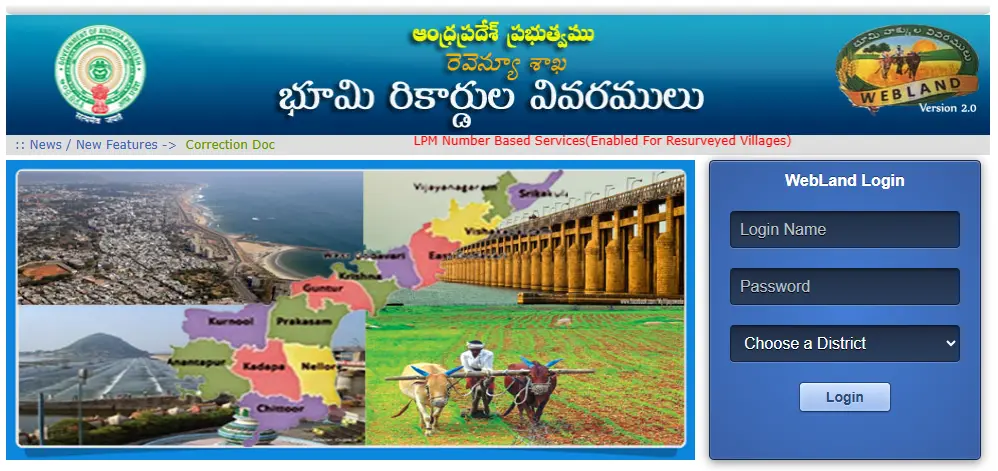
What is Webland AP? (The Backend Engine of AP Land Governance)
Webland AP is a highly secure, workflow-based web application developed by the National Informatics Centre (NIC) in collaboration with the Department of Revenue, Government of Andhra Pradesh. Controlled by the Chief Commissioner of Land Administration (CCLA), the apex authority overseeing revenue administration in the state, Webland AP acts as the single centralized database of truth for all landholdings.
Before the introduction of this centralized system, land records were manually written and maintained locally in physical books at individual Tehsil (Mandal) offices. This manual system suffered from severe security vulnerabilities, including physical data decay, unauthorized alterations, duplicate or fake Pattadar passbooks, and inconsistent records that required multiple in-person visits to government offices to verify.
Webland AP systematically replaced this paper ledger system with secure, digitally signed, and centralized relational databases. By moving physical records to standardized database formats, the state streamlined historical documents, such as Resettlement Registers (RSR) and field maps, preventing transcription errors and data tampering.
Webland AP vs. Meebhoomi AP: What is the Difference?
One of the most common user search errors involves confusion between Webland and Meebhoomi. Users frequently attempt to log into Webland looking for public downloads, or search Meebhoomi expecting administrative editing tools. Understanding the division of roles between these two platforms is crucial:
- Webland AP (
webland.ap.gov.in): This is a closed, secure Government-to-Government (G2G) backend database application. Only authorized revenue department officials (such as Tahsildars, Village Revenue Officers, and surveyors) and verified banking partners can access this interface. It is used to record land details, approve property mutations, create bank charges, and issue digitally signed land records. - Meebhoomi AP (
meebhoomi.ap.gov.in): This is the public-facing Government-to-Citizen (G2C) e-governance portal. It provides citizens across the globe with free, transparent, and direct access to land records in Telugu. Citizens can use Meebhoomi to search survey numbers, view landownership details, track mutation statuses, download certified copies of records, and submit online grievances.
To clarify these differences at a glance:
| Feature/Metric | Webland AP Backend System | Meebhoomi AP Public Portal |
|---|---|---|
| Primary URL | webland.ap.gov.in | meebhoomi.ap.gov.in |
| Primary Audience | Government Revenue Officials & Banks | Landowners, General Public, and Buyers |
| User Authentication | Official credentials + biometric/token audits | No login required for searches; Aadhaar OTP/biometrics for verification |
| Permitted Activities | Data ingestion, record correction, mutation approvals, and bank charge creation | Viewing/printing Adangal & 1B, tracking grievance status, and requesting corrections |
| Core Languages | English & Telugu | Primarily Telugu (Vernacular) |
Official Webland AP Login: Step-by-Step Portal Guide
Because Webland AP is a secure backend database, access is strictly limited to authorized personnel. The login mechanism is engineered with multi-factor authentication to ensure data security.
How Authorized Officers Login:
- Navigate to the official Webland AP portal (
webland.ap.gov.in). - On the secure homepage, enter your assigned administrative Username and Password.
- Select the District corresponding to your administrative jurisdiction from the dropdown menu.
- Perform the required security validation (such as captcha entry or biometric verification) and click Login to access your dashboard.
Who is Authorized to Login to Webland AP?
Only specific roles can access the backend of the portal:
- Revenue Department Officials: Village Revenue Officers (VROs), Mandal Revenue Officers (MROs)/Tahsildars, Deputy Tahsildars, Joint Collectors, and District Collectors.
- Survey Officials: Dedicated surveyors and field inspectors executing cadastral mappings.
- Registered Banking Partners: Authorized officers at commercial and cooperative banks who need to register or release loan charges.
Security Audits and Hardware Tokens (POLR Portal Access)
To maintain complete data security and prevent unauthorized changes, Webland AP utilizes a strict role-based workflow. Revenue officers cannot make arbitrary modifications; every step must pass authentication checks, and final data entries require authorized digital signatures, which are then immediately pushed to the public Meebhoomi portal.
Citizen Services Powered by Webland AP (Via Meebhoomi)
While citizens cannot log directly into Webland AP, the backend database dynamically powers the citizen services available on the Meebhoomi portal. These services are essential for property buying, crop insurance, and verification of clear titles.
How to View and Download Adangal (Pahani) and 1B Documents
The two most critical documents for verifying land titles in Andhra Pradesh are the Adangal and the 1B Record of Rights:
- Adangal (Pahani): Maintained on the backend and refreshed in real-time, the Adangal contains survey-number-wise details, including the total area of the land parcel, land classification, soil type, water sources, and seasonal crop booking details (e-Panta).
- 1B Record of Rights: This document provides a legal summary of a specific landholder’s (Pattadar’s) entire landholding within a village, specifying the khata number, ownership history, and any active encumbrances.
To view and download these documents on Meebhoomi:
- Go to
meebhoomi.ap.gov.inand select Adangal or 1B from the main menu. - Choose your District, Mandal, and Village from the dropdown options.
- Search using either the Survey Number, Khata Number, Aadhaar Number, or Landowner Name.
- Enter the security captcha code and click Submit. The digitally signed, legally valid document will load on your screen, ready for download or printing.
How to Download Your E-Pattadar Passbook Online
The Pattadar Passbook (PPB) is the official title document issued to landowners. The CCLA now issues digital e-Pattadar Passbooks, eliminating manual errors and preventing the circulation of fake physical passbooks.
To secure an e-passbook online:
- Visit the Meebhoomi portal and select the Electronic Pattadar Passbook download option.
- Input the District, Mandal, and Village details.
- Enter your Khata Number and Registered Mobile Number.
- Input your Aadhaar Number to trigger a secure OTP (One-Time Password) verification.
- Upon successful OTP entry, the system fetches the validated record from Webland and generates the e-Pattadar Passbook.
Mutations, Webland 2.0, and Blockchain Automation
Andhra Pradesh has continually updated its land administration technologies to introduce greater security and transparency. The latest system, Webland 2.0, introduces key automation features designed to eliminate administrative delays and prevent database manipulation.
The Leap to Webland 2.0 and Auto-Mutations
In classic land systems, property mutation (updating ownership records in the revenue registry after a sale) required filing separate physical applications at the Mandal Revenue Office, leading to long processing delays.
Under Webland 2.0, the state-wide resurvey of land parcels assigns a unique Land Parcel Number (LPM) (or Unique Land Parcel Identification Number – ULPIN) using geo-referenced cadastral maps via the Bhunaksha software. Once this LPM is verified, it acts as a single database key across departments.
To eliminate manual bottlenecks, auto-mutation has been introduced. The instant a sale deed is registered at the Sub-Registrar’s Office, secure APIs automatically trigger a backend update in Webland 2.0, transferring ownership in seconds without manual intervention.
Hyperledger Blockchain Integration (“Property Chain”)
To guarantee absolute security and protect land records from database manipulation, the Government of Andhra Pradesh launched a pilot blockchain-based land records system. Developed in partnership with the National Informatics Centre’s Centre of Excellence in Blockchain Technology, this system is known as the Property Chain.
The Property Chain operates through a highly secure, decentralized framework:
- ID Creation: The Survey & Revenue Departments generate a unique Blockchain ID linked to the land’s verified LPM.
- Cryptographic Logs: Verified transaction details are cryptographically packaged and pushed to the Blockchain server.
- Append-Only History: Ownership modifications (Record of Rights fields) are recorded in an append-only, synchronized database.
- Anti-Fraud Security: Because the records are distributed and cryptographically locked, unauthorized alterations to the database are virtually impossible, protecting landowners from title fraud.
Troubleshooting Common Webland AP Issues & Errors
Given the scale of land records database integrations, users occasionally encounter technical or administrative errors. Understanding how to resolve these issues can save landowners significant time.
How to Resolve “Webland Not Signed” by Tahsildar
A common issue on the Meebhoomi public portal is the warning: “Webland Record Not Signed by Tahsildar.” This indicates that while the textual record of a land parcel exists in the database, the local Tahsildar (Mandal Revenue Officer) has not yet applied their digital signature to authorize the record. Unsigned digital records are generally not accepted by banks for securing agricultural credit or crop loans.
To resolve this issue:
- Visit your nearest Mandal Revenue Office (MRO) under whose jurisdiction your property falls.
- Submit a written request along with supporting documents, including your registered sale deed, your Aadhaar card, and previous tax receipts.
- The Tahsildar will log into the backend Webland portal, open the Webland Corrections Module, and pull up the Survey Pattadar Table for your survey number.
- The Tahsildar will verify your original paper records against the digital entries.
- Once verified, the Tahsildar will execute biometric verification and apply their digital signature to the record. The update will sync with the public Meebhoomi portal, changing your record status to digitally signed.
Seeding Your Aadhaar Card to Webland AP
To prevent duplicate beneficiaries, eliminate fraudulent land holdings, and verify genuine land ownership, Andhra Pradesh requires all landowners to seed their Aadhaar numbers with their land khata numbers. The state has developed a dedicated web-based UID Seeding Android Application to streamline this process.
If you need to seed your Aadhaar with your land records, you can do so through your local Rythu Seva Kendra (RSK) or via an authorized revenue officer using the official app:
- App Launch: The revenue officer opens the UID Seeding Android App (V2.0) downloaded from the Webland homepage.
- Khata Selection: The officer inputs your District, Mandal, and Village details, and selects your land Khata Number.
- Exception Checks: If the original landowner is deceased or non-traceable, the app allows the officer to check specific exception boxes, such as:
- Death
- Double Khatas
- Non-Residential
- Sold out
- Non-Traceable Khatedars
- Notional Khata
- Aadhaar Entry: The officer enters your 12-digit Aadhaar number and your mobile number.
- Biometric Verification: You must perform biometric fingerprint authentication on the linked scanning device.
- Server Synchronization: The app transmits the data directly to the central Webland servers, displaying a confirmation message: “Aadhaar seeding successfully completed.” This securely links your identity to your land records.
Frequently Asked Questions (FAQ)
Can citizens log directly into Webland AP?
No. Webland AP (webland.ap.gov.in) is an exclusive backend administrative portal designed for government revenue officers, surveyors, and authorized banks. Citizens who want to check land records, download reports, or submit applications must use the public Meebhoomi portal (meebhoomi.ap.gov.in).
Can I check land records for free on Meebhoomi?
Yes. Viewing and downloading your Adangal (Pahani) and 1B Record of Rights on the Meebhoomi portal is completely free. If you require digitally signed, legally valid certificates for official use or banking, you can secure them for a nominal processing fee (typically ₹25) through authorized MeeSeva Centers.
How long does a standard manual mutation process take?
If a transaction does not qualify for the automated Webland 2.0 auto-mutation, a manual mutation follows a structured SLA timeline. The statutory process takes approximately 25 days, broken down as follows:
- Days 1 to 8: Submission of the application via Rythu Seva Kendras (RSK) and generation of the Form-8 Notice.
- Days 9 to 15: Publication of the Form-8 Notice for public objections.
- Days 16 to 18: Physical field inspection and report submission by the Village Revenue Officer (VRO).
- Days 19 to 22: Tahsildar review and processing of the inspection report.
- Days 23 to 24: Appeals reviewed by the Sub-Collector or Revenue Divisional Officer (RDO) if necessary.
- Day 25: Final database disposal and application of the Tahsildar’s digital signature, syncing the updated record with Meebhoomi.